

General Settings
Configure how UiChemy behaves on your site: per-builder registration, front-end editing, scroll timeline, editor mode, the MCP server, form storage, and uninstall behavior.
Configure how UiChemy behaves on your site. Changes here affect every Composer widget and every user on the site.
Opening Settings
Open Settings
Go to UiChemy → Settings in your WordPress dashboard.
Adjust and save
Settings are grouped into four sections. Adjust what you need, then click Save changes at the bottom right to apply.
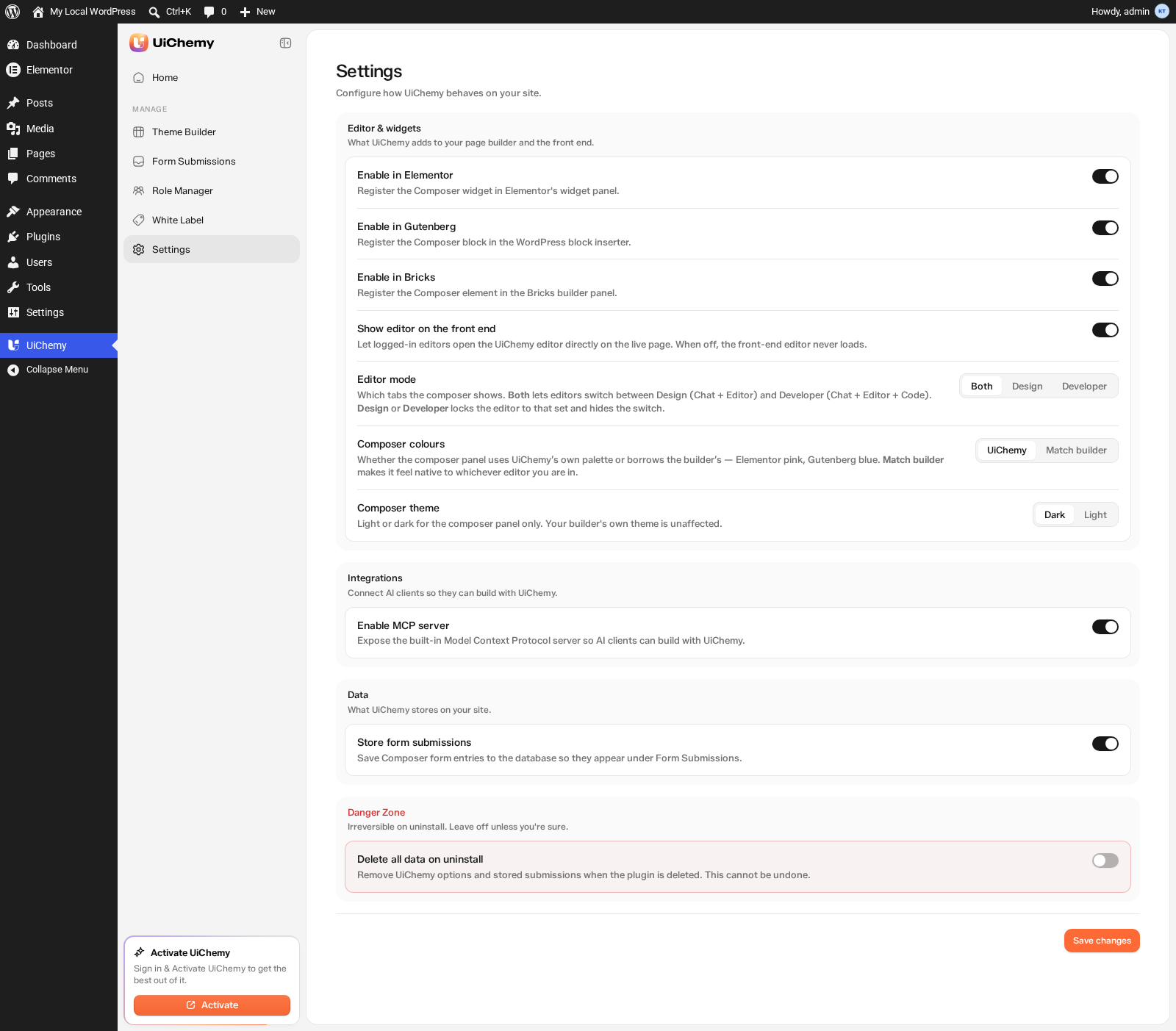
UiChemy → Settings, all four sections
Editor & Widgets
What UiChemy adds to your page builder and the front end.
| Setting | What it does | Default |
|---|---|---|
| Enable in Elementor | Register the Composer widget in Elementor's widget panel. | On |
| Enable in Gutenberg | Register the Composer block in the WordPress block inserter. | On |
| Enable in Bricks | Register the Composer element in the Bricks builder panel. | On |
Each builder has its own switch, so you can register the Composer only where you actually use it. Turning one off doesn't affect the others, and doesn't touch Composers already on your pages.
Integrations
Connect AI clients so they can build with UiChemy.
Enable MCP server. Expose the built-in Model Context Protocol server so external AI clients, such as Claude, Cursor, or other MCP-compatible tools, can connect and build with UiChemy directly. Turn this off if you're not using any AI client integrations and want to reduce the plugin's footprint. Default: On.
Data
What UiChemy stores on your site.
Store form submissions. Save Composer form entries to the database so they appear under Form Submissions. Turn this off if you don't need to store submission data, for example, if you're only sending submissions to an email address and don't want database entries. Default: On.
Danger Zone
Irreversible on uninstall. Leave off unless you're sure.
Delete all data on uninstall. Remove UiChemy options and stored submissions when the plugin is deleted from Plugins → Installed Plugins. Your page and post content, including anything built with Theme Builder templates, is not touched either way, that's your content, not plugin housekeeping. Leave this off if you may reinstall UiChemy later and want to keep your settings and submissions too. Default: Off.
This cannot be undone. If you enable this setting and then delete the plugin, all your UiChemy data is gone permanently. Export any form submissions you need before deleting.
Save Changes
Click Save changes in the bottom right to apply any setting changes.