

White Label Overview
Rebrand UiChemy everywhere it shows, with a live preview of every change. Requires Pro.
White Label lets you replace UiChemy's name, logo, and identity with your own agency or product branding. Your clients see your brand everywhere UiChemy would normally appear, the WordPress admin sidebar, the Plugins screen, and the Elementor widget panel, with no trace of the UiChemy name.
White Label requires UiChemy Pro. See Free vs Pro.
Without Pro
On the free plan, UiChemy → White Label shows a White Label Pro screen instead of the settings: "Ship it as your own product, your name, your logo, no original branding." Under What you'll unlock, it lists Rebrand it fully (name, logo, author and description), Rename the widget (Composer widget name, icon and category) and Control visibility (hide help links; restrict to one owner). Click Upgrade to Pro to go to the UiChemy Pricing page, or See everything in Pro to see the rest of what Pro includes.
Role Manager and White Label are both marked with a crown in the sidebar on the free plan. Even if branding was saved while Pro was active, the free plugin ignores it and shows UiChemy's own branding. Your saved settings aren't deleted, so they come back when Pro is active again.
What Is White Label
Go to UiChemy → White Label in your WordPress dashboard. This feature is designed for agencies and developers who build and hand over sites to clients.
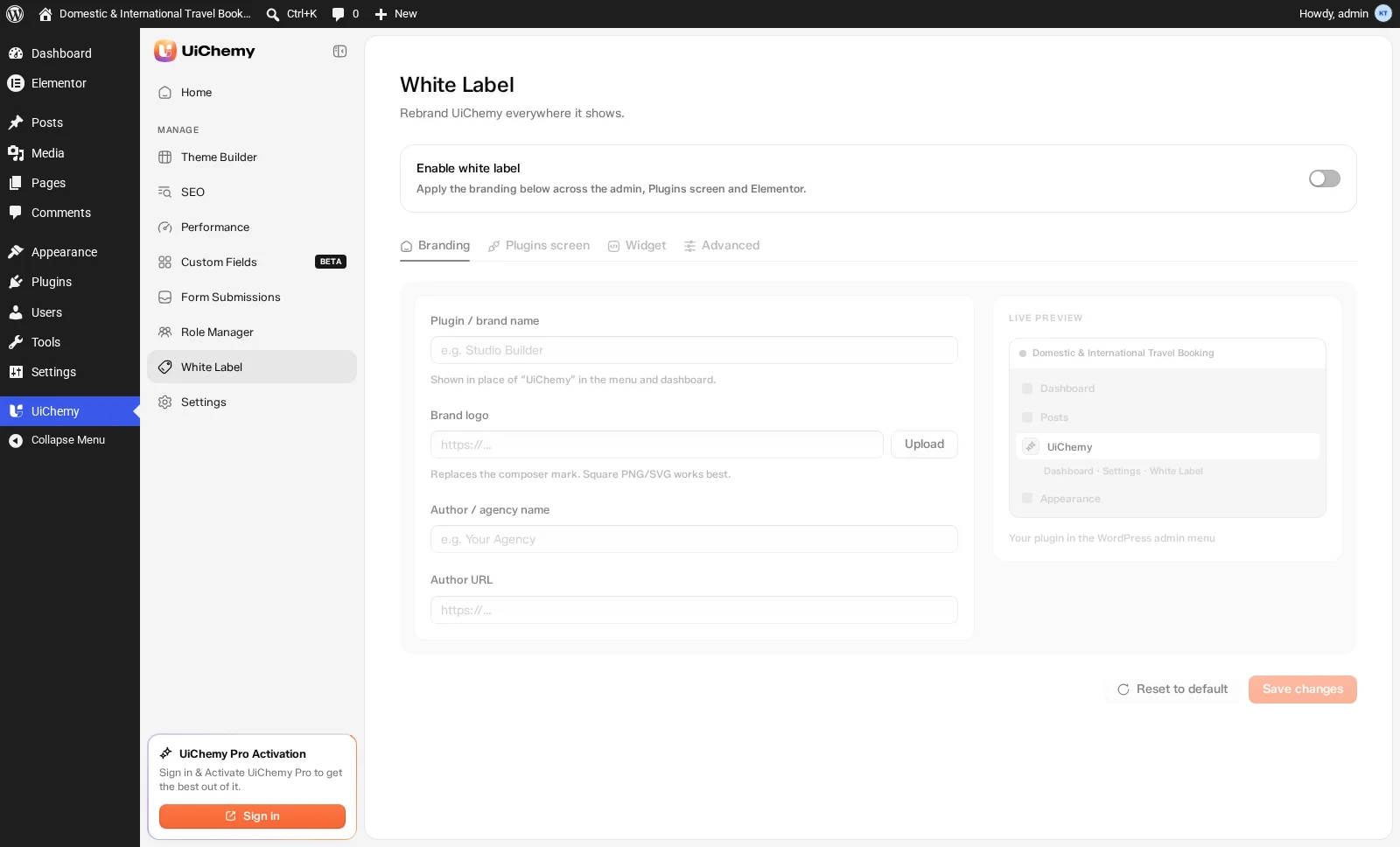
The Branding tab, with the Live Preview panel on the right
The Master Switch
At the top of every White Label tab, you'll find the Enable white label toggle, the master switch that applies the branding below across the admin, Plugins screen, and Elementor.
This is a single on/off switch for all White Label branding. When it's off, none of the branding changes are applied, even if you've filled in all the fields. Turn it on to activate everything at once.
While the switch is off, the tabs and fields below it are dimmed and can't be edited, and Save changes is disabled. Turn it on and the form becomes active.
Default: Off.
The Four Tabs
White Label settings are split across four tabs, each controlling a different area of the WordPress admin:
| Tab | What it controls |
|---|---|
| Branding | The plugin name, logo, and author details shown in the WordPress admin sidebar and dashboard |
| Plugins screen | The description, site link, and admin visibility for the plugin's row in the WordPress Plugins list |
| Widget | The widget name, category, and icon shown inside the Elementor editor |
| Advanced | Options to hide UiChemy notices and lock down the White Label page from clients |
Live Preview
Every tab has a Live preview panel on the right. As you type, it updates instantly so you can see exactly how your branding will look before saving. Each preview is captioned to say what you're looking at:
| Tab | Preview shows | Caption |
|---|---|---|
| Branding | The WordPress admin menu with your name and logo | Your plugin in the WordPress admin menu |
| Plugins screen | Your row on the Plugins list, with description, version, and author | Your row on the Plugins screen |
| Widget | The widget tile as it appears in Elementor's panel | How the widget appears in Elementor |
| Advanced | The WordPress admin menu | Your plugin in the WordPress admin menu |
Reset to Default
The Reset to default button at the bottom left clears every field on all four tabs and turns White Label off, so UiChemy's own branding comes back everywhere. It asks Reset white label? first, then click Reset. The button is disabled while everything is already at its defaults.