

SMTP Email Overview
Send your site's email through your own mail server or Gmail from UiChemy → Settings → SMTP, so form notifications and other site emails reach the inbox.
SMTP makes your WordPress site send its email through a real mail server. Many hosts send email in a way that is never delivered or lands in spam. With SMTP on, form notifications and other site emails go out through your own server or your Gmail account instead.
SMTP arrived in UiChemy 5.6.1. It is in the free plugin.
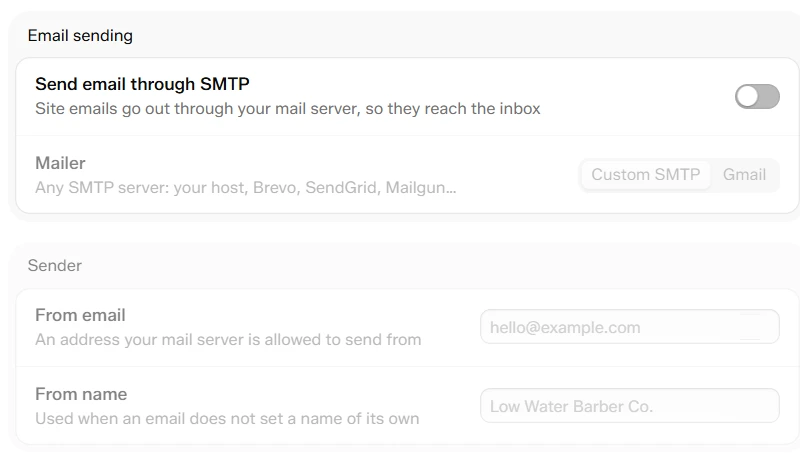
Settings → SMTP with the switch off. Everything below it is greyed out until you turn it on.
At a Glance
| Item | Details |
|---|---|
| Where | UiChemy → Settings → SMTP, under Connect |
| Added in | UiChemy 5.6.1 |
| Mailers | Custom SMTP (any server) or Gmail (Google sign-in) |
| Covers | All email WordPress sends, not only UiChemy forms |
| Who can change it | Administrators |
Why It Matters
- Form emails arrive. A contact form is no use if its notifications go to spam or never come.
- Every site email follows. Password resets and store emails use the same server, because UiChemy hooks into WordPress's own mail function.
- Your name, your address. Emails come from an address your server allows, not from
wordpress@yourdomain.
Use Cases
- A contact form that must reach the client: set up SMTP, then use the form's Email a notification action.
- An agency site on a basic host: send through Brevo, SendGrid or Mailgun, so delivery does not depend on the host.
- A small business on Gmail: connect the Google account the team already uses.
Set It Up
Open SMTP
Go to UiChemy → Settings and click SMTP in the left sidebar.
Turn it on
Turn on Send email through SMTP. Until you do, nothing below it applies.
Choose a mailer
Pick Custom SMTP for any mail server, or Gmail for a Google account. See Set Up Custom SMTP and Set Up Gmail.
Save
Click Save changes in the bar at the bottom. The bar shows how many changes are waiting, and Discard drops them.
Send a test email
Under Test email, type your address and click Send. See Test and Troubleshoot.
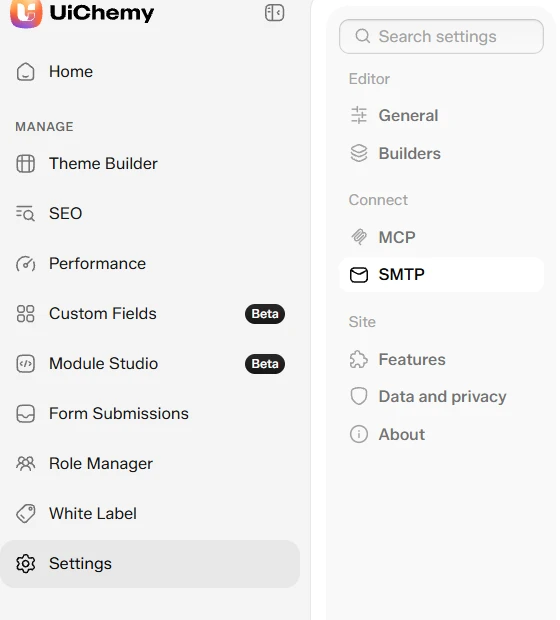
SMTP sits under Connect in the Settings sidebar, next to MCP

The save bar appears when you have changes waiting
The Sender
The Sender group sets who emails come from.
| Field | What it does |
|---|---|
| From email | An address your mail server is allowed to send from. With Gmail it is fixed to the connected account. |
| From name | Used when an email does not set a name of its own. |
The name is a default, not an override. A form's own From name, or the store name WooCommerce sends with, is kept. Only WordPress's built-in "WordPress" name, or no name, is replaced.
Leave From email blank on Custom SMTP and UiChemy uses your Username when it is an email address. Most providers refuse a From address that is not the account you signed in with.
Where Your Passwords Are Kept
The SMTP password, the Google client secret and the Google sign-in token are stored encrypted. The settings screen never shows them. It only shows that one is saved, and the field stays empty. Type in it to replace the saved one.