

Page Cache Settings
Every control on Performance → Page cache: who caches, usage, freshness, rules, the page check, Preload and Cloudflare for Pro, and the plugins UiChemy handles for you.
Once Cache pages is on, the rest of the screen appears. Everything saves the moment you change it. This page explains each group, top to bottom.
Who Caches Your Pages
The Who caches your pages menu decides which cache does the work.
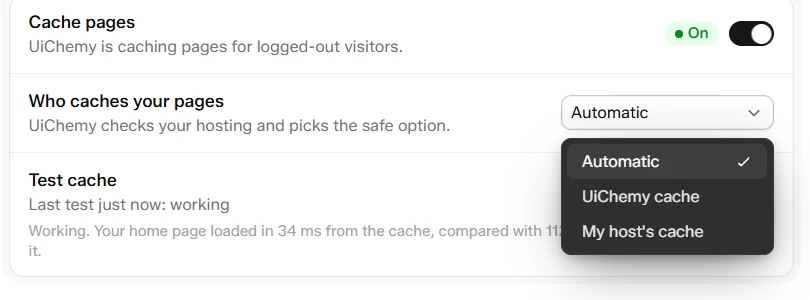
Who caches your pages: Automatic, UiChemy cache or My host's cache
| Option | What it does |
|---|---|
| Automatic | UiChemy checks your hosting and picks the safe option. If a host cache is found, it says "Detected [host]". |
| UiChemy cache | UiChemy caches pages itself, even if your host has a cache too. |
| My host's cache | UiChemy stays out of the way and only clears your host's cache when you save. |
If you pick UiChemy cache on a host that already caches pages, the screen shows "Your host already caches pages". Running two caches can show visitors old content. Keep this only if your host's support told you to.
Usage
When UiChemy is doing the caching, a Usage group shows how often visitors got a ready-made copy.
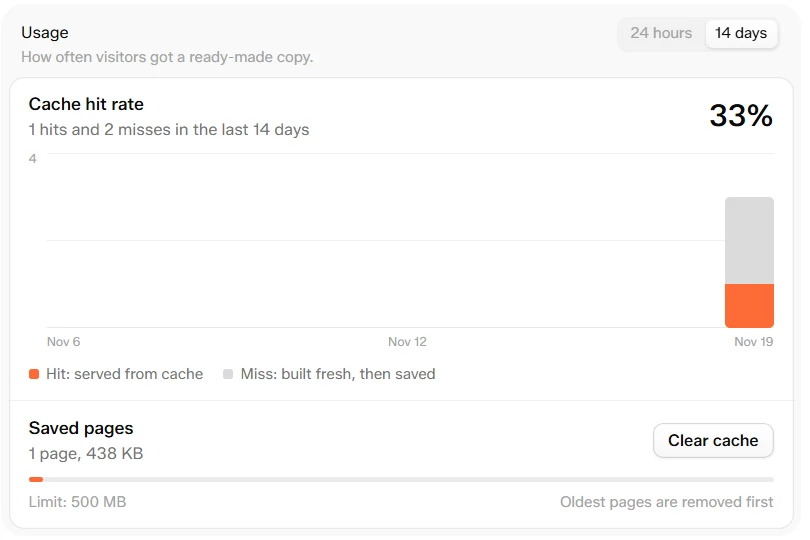
Usage: hit rate, a chart and the saved pages
- Cache hit rate: the share of visits served from the cache, with the number of hits and misses in the last 14 days. Switch the chart between 24 hours and 14 days. Hover a bar to read it.
- Hit means a visit served from the cache. Miss means a page built fresh and then saved: the first visit after a change, a clear or the refresh time.
- Saved pages: how many pages are saved and how much space they use, with a bar against the 500 MB limit. Oldest pages are removed first.
- Clear cache: empties the cache. Pages rebuild as visitors arrive.
A low hit rate is normal on a new site, right after a clear, and on sites with little traffic, because each page is built once per refresh. Visits to pages that can never be cached, such as logged-in visitors, 404 pages and files like robots.txt, are not counted.
Freshness
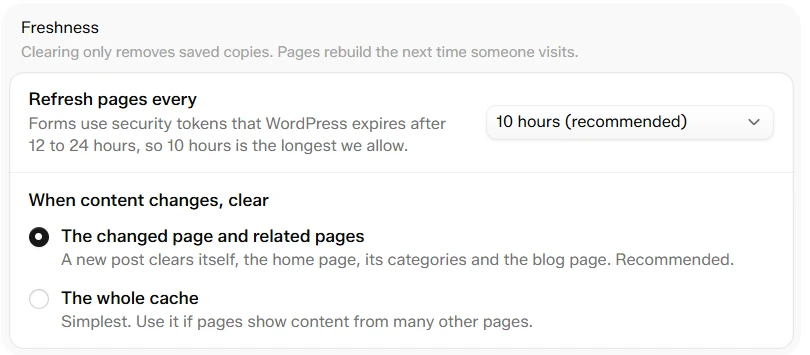
Freshness: how long copies last and what is cleared on a change
Refresh pages every sets how long a saved copy lives before it is rebuilt.
| Option | Note |
|---|---|
| 2 hours | Fresh more often, more rebuilds |
| 6 hours | A balance |
| 10 hours (recommended) | The longest allowed. Forms use security tokens that WordPress expires after 12 to 24 hours, so 10 hours is the limit |
When content changes, clear decides what UiChemy removes when you update something.
| Option | What it clears |
|---|---|
| The changed page and related pages (recommended) | A new post clears itself, the home page, its categories and the blog page. |
| The whole cache | The simplest choice. Use it if your pages show content from many other pages. |
Rules
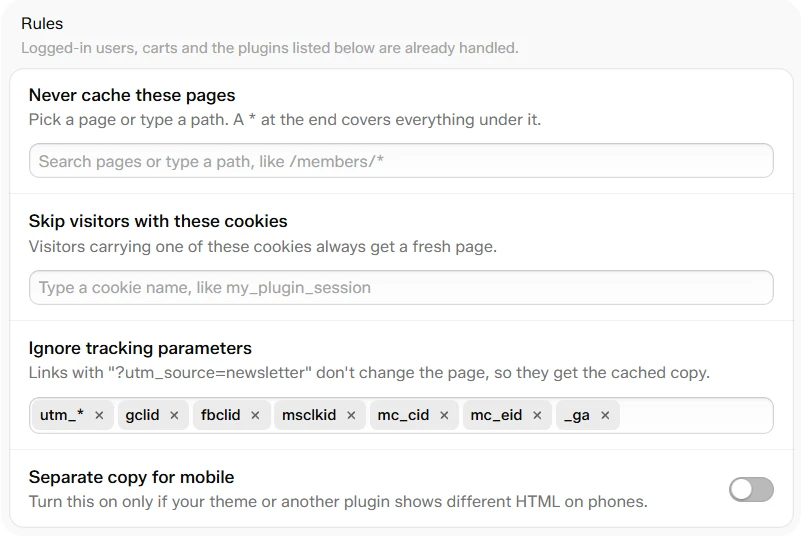
Rules: pages and cookies to skip, tracking parameters and the mobile copy
Logged-in users, carts and the plugins listed under Plugins Handled Automatically are already handled. You can add exclusions, but you cannot remove the built-in safety rules.
- Never cache these pages. Search for a page, or type a path that starts with
/, like/members/*. A*at the end covers everything under it. A page you pick from the list follows it if its address changes. - Skip visitors with these cookies. Visitors carrying one of these cookies always get a fresh page. Type a cookie name, like
my_plugin_session, using letters, numbers,-and_only. - Ignore tracking parameters. A link like
?utm_source=newsletterdoes not change the page, so it gets the cached copy. The list starts withutm_*,gclid,fbclid,msclkid,mc_cid,mc_eidand_ga. Click the field to pick more from a list that includes Google Ads, Facebook, Instagram, TikTok, LinkedIn, HubSpot and Marketo parameters. Restore defaults appears once you change the list. - Separate copy for mobile. Turn this on only if your theme or another plugin shows different HTML on phones. If UiChemy notices this, a row says "Some pages change on phones" and points you here.
Test a Page
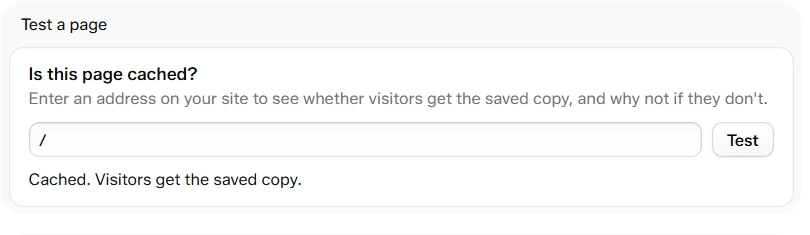
Is this page cached? A cached page
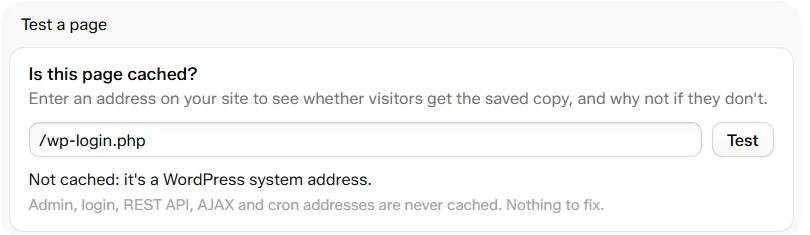
A page that is never cached tells you why
Under Test a page, type an address on your site, like /about/, and click Test. You get one of three answers:
- "Cached. Visitors get the saved copy."
- "Not cached yet. It will be saved on the next visit."
- "Not cached: [reason]." with an explanation and what to do. The example above is a WordPress system address, which is never cached.
Preload (Pro)
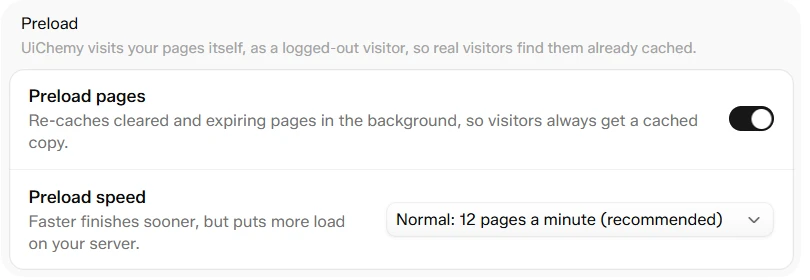
Preload: UiChemy visits your pages so visitors find them cached
Preload pages makes UiChemy visit your pages itself, as a logged-out visitor, so real visitors find them already cached. It re-caches cleared and expiring pages in the background, and a note shows progress, like "12 of 40 pages rebuilt".
| Preload speed | Pages a minute |
|---|---|
| Gentle | 4 |
| Normal (recommended) | 12 |
| Fast | 30 |
Faster finishes sooner but puts more load on your server. On the free plan the row shows a Pro tag and the switch is locked.
Cloudflare (Pro)
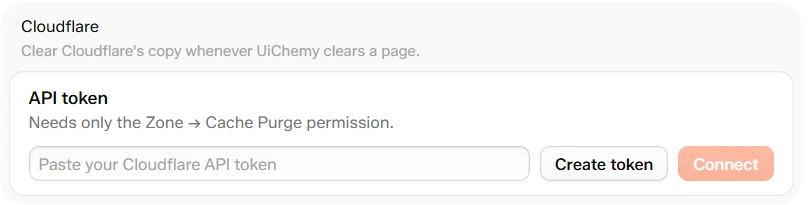
Cloudflare: connect a token so UiChemy clears Cloudflare too
If your site runs behind Cloudflare, connect it and UiChemy also clears Cloudflare's copy whenever it clears a page.
Create a token
Click Create token. Cloudflare opens in a new tab. Create an API token with only the Zone → Cache Purge permission.
Paste and connect
Paste it into Paste your Cloudflare API token and click Connect.
When connected, the row reads "Connected to [your zone]" with the last four characters of the token. UiChemy cannot show the token again. Click Disconnect to remove it. On the free plan the row shows Clear Cloudflare with UiChemy with a Pro tag.
Plugins Handled Automatically
If UiChemy finds one of these plugins, a Plugins handled automatically group lists it and applies safe rules. You do not need to do anything.
| Plugin type | What UiChemy does |
|---|---|
| WooCommerce | Cart, checkout and account pages are never cached. Visitors with items in their cart always get a fresh page. Product pages clear when stock or price changes. |
| Easy Digital Downloads | Checkout and purchase confirmation pages are never cached. Visitors with items in their cart always get a fresh page. |
| SureCart | Checkout, customer dashboard and account pages are never cached. |
| Booking plugins | Pages with a booking form are never cached, so availability is always current. |
| Gravity Forms | Pages with a Gravity Forms form are never cached. |
| Other form plugins | Pages with forms are cached and refreshed within 10 hours, so form security tokens stay valid. |
| Payment forms | Pages with a payment form are never cached. |
| Membership and course plugins | Account, login, checkout and member-only pages are never cached. |
| AffiliateWP | Visitors arriving through an affiliate link always get a fresh page, so the referral is recorded. |
| Multilingual plugins | Each language is cached separately using its own address. Pages that change language without changing the address are not cached. |
| Cookie consent plugins | No change needed. Consent banners work with cached pages. |