

Ready-Made Sections
The 21 ready-made sections in the UiChemy Composer Page Builder library, grouped by category, plus the 12 elements you can add one at a time.
The Sections tab of the Add panel has ready-made sections you can add to a page with one click. Each one comes with sample text and images that you replace with your own.
Open the Library
Click Add section in the sidebar and choose the Sections tab. Use the category chips (All, Hero, Logos and so on) or the Search box to narrow the list.
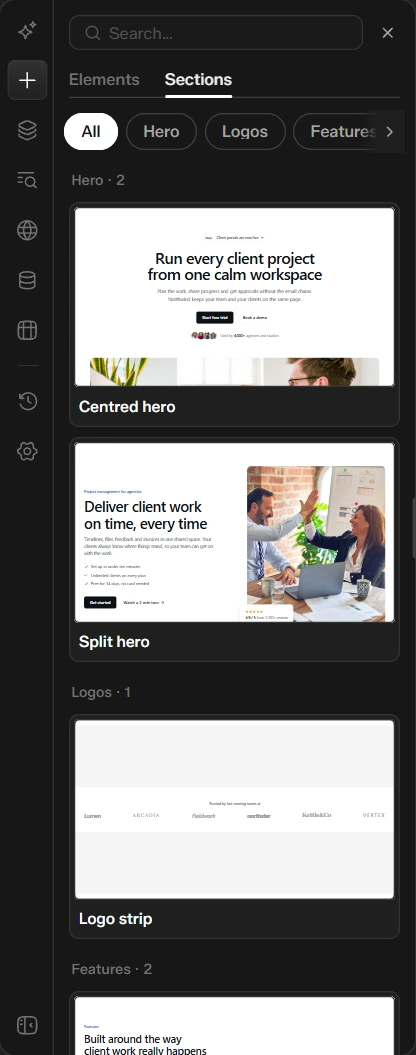
Sections for Pages
| Category | Sections |
|---|---|
| Hero | Centred hero, Split hero |
| Logos | Logo strip |
| Features | Feature grid, Image and text |
| Process | How it works in 3 steps |
| Stats | Stats with numbers |
| Testimonials | Single testimonial, Testimonial cards |
| Pricing | Pricing with yearly switch |
| Team | Team grid |
| FAQ | FAQ accordion |
| Blog | Latest blog posts, Posts grid with page numbers, Posts list with page numbers, Posts with category filter, Browse by category |
| Call to action | Call to action, Newsletter signup |
| Contact | Contact form |
Elements
The Elements tab adds single pieces to a section:
| Group | Elements |
|---|---|
| Basic | Heading, Text, Button, Image, Video, Icon |
| Layout | Columns, Spacer, Divider |
| Content | Badge, Card, List |
Sections for Templates
When you edit a Theme Builder template, the library shows sections made for that kind of template instead of the page sections. See Templates in the Builder.
Add One and Make It Yours
- Click a section. It is added to the page and selected.
- Change its text, images and colors in the Design panel on the right.
- Use Layers and the shortcuts to move it, duplicate it or delete it.
See Build and Edit a Page for the full flow.
Was this page helpful?