

Global Style: The Design System
How UiChemy's Global Style Manager works: the globals style block, what it stores, and how CSS variables, typography classes, and utility classes flow to every UiChemy Composer widget.
The Global Style Manager creates a single <style> block injected into your site's <head>, containing CSS custom properties, typography definitions, and utility classes. This block appears on every page of your site, not just pages where a Composer widget is active.
<style id="uichemy-globals">
  :root {
    --color-brand: #4F46E5;
    --color-text: #1a1a1a;
    --color-bg: #ffffff;
    --font-heading: 'Inter', sans-serif;
    --font-size-base: 1rem;
  }
  .text-heading-h1 { font-size: 3rem; font-weight: 700; }
  .uc-boxed { max-width: 1200px; margin-inline: auto; }
</style>
What You Can Store
| Type | Description | Example |
|---|---|---|
| CSS Variables | Custom properties in :root, organized into collections you name and create yourself | --color-brand: #4F46E5 |
| Typography Classes | .text-* classes for heading/body text | .text-heading-h1 |
| Other Classes | Any reusable class without text styling, cards, buttons, containers, and more, written as plain CSS | .uc-boxed |
The manager preserves @media rules and any custom CSS you add.
On the free plan, Global Style supports up to 2 variable collections, 1 typography class, and 1 other class (component or button). UiChemy Pro removes all three caps. See Free vs Pro.
Accessing the Manager
Open the Code tab
Select a Composer widget and click Code in the switcher at the top of the panel (Chat, Editor, Code).
Go to Globals
Click the Globals tab. It shows a summary of your globals: Colors, Text, and Sizes, with a count for each.
Open a section
Click a row, for example Colors, to open the Globals manager on that section.
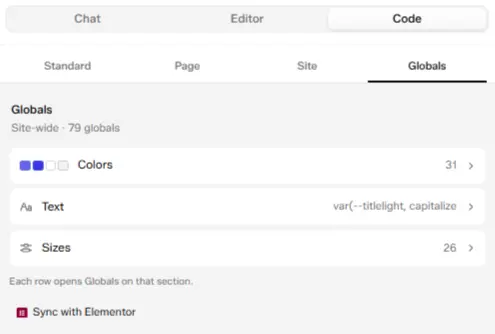
The Globals tab summary: click a row to open the Globals manager
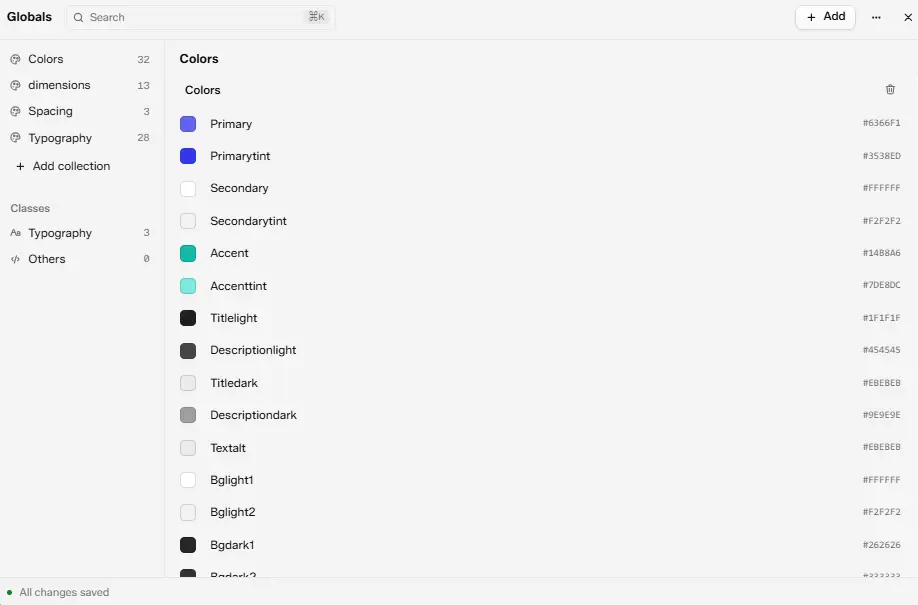
The Globals manager, open on the Colors collection
Variable collections (you name each one, for example Colors or Dimensions) and Classes (Typography, Others) live together in one manager with a left-hand list, there's no separate tab for each.
Inside the Globals Manager
Direct raw-CSS editing of the same style block happens in a different place entirely, the Code tab's Site scope, under "Before </head>". See Code Tab.
Using Global Values in UiChemy Composer Widgets
Reference a variable in any widget's CSS with var(), for example background: var(--color-brand). They also work inside Twig expressions for dynamic inline styles. Apply a class directly in the widget's HTML, for example <h1 class="text-heading-h1">.
AI Access Over MCP
Connected AI clients can read and update your Global Style CSS through UiChemy's MCP integration, included in Free, so design tokens stay part of AI-driven workflows too. See Set up UiChemy MCP.
Use Cases
- Keeping a client's brand consistent, define colors, fonts, and spacing once instead of redefining them per widget.
- Rebranding a site in one place, change a variable or class once and every Composer widget using it updates automatically.
- Letting a connected AI tool adjust design tokens, read and update Global Style CSS over MCP instead of editing it by hand.