

Open the Builder
How to open the UiChemy Composer Page Builder with Edit with UiChemy, what happens to a page that already has content, and what to do if the button is missing.
You open the builder from WordPress's own editor screens. Every entry point is called Edit with UiChemy.
Open a Page From the Block Editor
- In WordPress, go to Pages → Add Page, or open an existing page.
- In the editor header, click the orange Edit with UiChemy button.

The builder opens full screen. A new, untitled page is saved as a draft first and named uichemy-page followed by its number, for example uichemy-page #17.
The same button is also in the UiChemy panel in the editor's sidebar.
Other Ways In
| Where | What you see | When it shows |
|---|---|---|
| Classic editor | An Edit with UiChemy button in the Publish box | Pages and posts in the Classic editor |
| Pages and Posts lists | An Edit with UiChemy link under the title | Only for pages already built with UiChemy |
| Front of your site | Edit with UiChemy in the admin bar | Only on pages built with UiChemy |
| Theme Builder templates | Edit with UiChemy in the block editor | Header, footer and other templates. See Templates in the Builder |
A page only gets the list link and the admin bar link after it has been opened in the builder once. That keeps Elementor and Gutenberg pages free of extra links.
A Page That Already Has Content
If the page already has content made somewhere else, UiChemy stops and shows This page already has content before it opens the builder:
- UiChemy imports the content as one HTML section, so you can keep editing it in the builder.
- Blocks and shortcodes are converted to their current HTML, so dynamic blocks (latest posts, forms) stop updating on their own.
- If the page is built with Elementor, UiChemy shows the imported content instead of the Elementor layout once the import is done.
- The page as it is now is saved as a revision first, so you can restore it from its history.
Click Import and open in UiChemy to continue, or Cancel to leave the page as it is.
After You Open It
When you go back to the block editor for a page built in UiChemy, a notice reads:
This page is built with UiChemy. Changes saved here are not shown on the site, and the next save in the builder replaces them. Edit the page in the builder instead.

Click Edit with UiChemy in the notice to return to the builder. Edit the page in the builder, not in the block editor.
Leave the Builder
Click the UiChemy logo at the top left to open the builder menu:
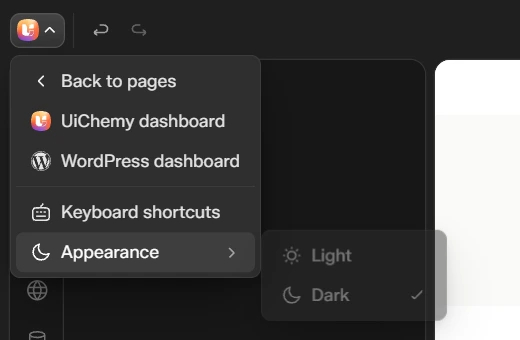
| Item | What it does |
|---|---|
| Back to pages | Returns to your list of pages |
| UiChemy dashboard | Opens the UiChemy dashboard |
| WordPress dashboard | Opens the WordPress dashboard |
| Keyboard shortcuts | Shows every shortcut. See A Tour of the Builder |
| Appearance | Switches the builder between Light and Dark |
If You See a Message Instead
I Can't See Edit with UiChemy
- UiChemy Builder is off. Check UiChemy → Settings → Builders.
- You can't edit that page. You need permission to edit the page in WordPress.