

How to Create Ready-to-Launch WordPress Sites From ChatGPT Using the UiChemy Plugin
Connect the UiChemy AI Website Creator plugin to ChatGPT, build and edit a project by chat, and prepare it for WordPress.
Want a ready-to-launch WordPress site without starting from a blank page? Just describe it in ChatGPT.
Build, edit, and check WordPress-ready sites by chatting in ChatGPT with the UiChemy AI Website Creator plugin, then bring them into WordPress.
UiChemy AI Website Creator is a ChatGPT plugin that builds websites by chat. Tell it about a business or paste a client brief, and it drafts a multi-page site from the UiChemy section library: sitemap, layouts, copy, colors, and fonts. The result is a real project in your own UiChemy account, which you keep editing on the UiChemy canvas and bring into WordPress with the UiChemy plugin.
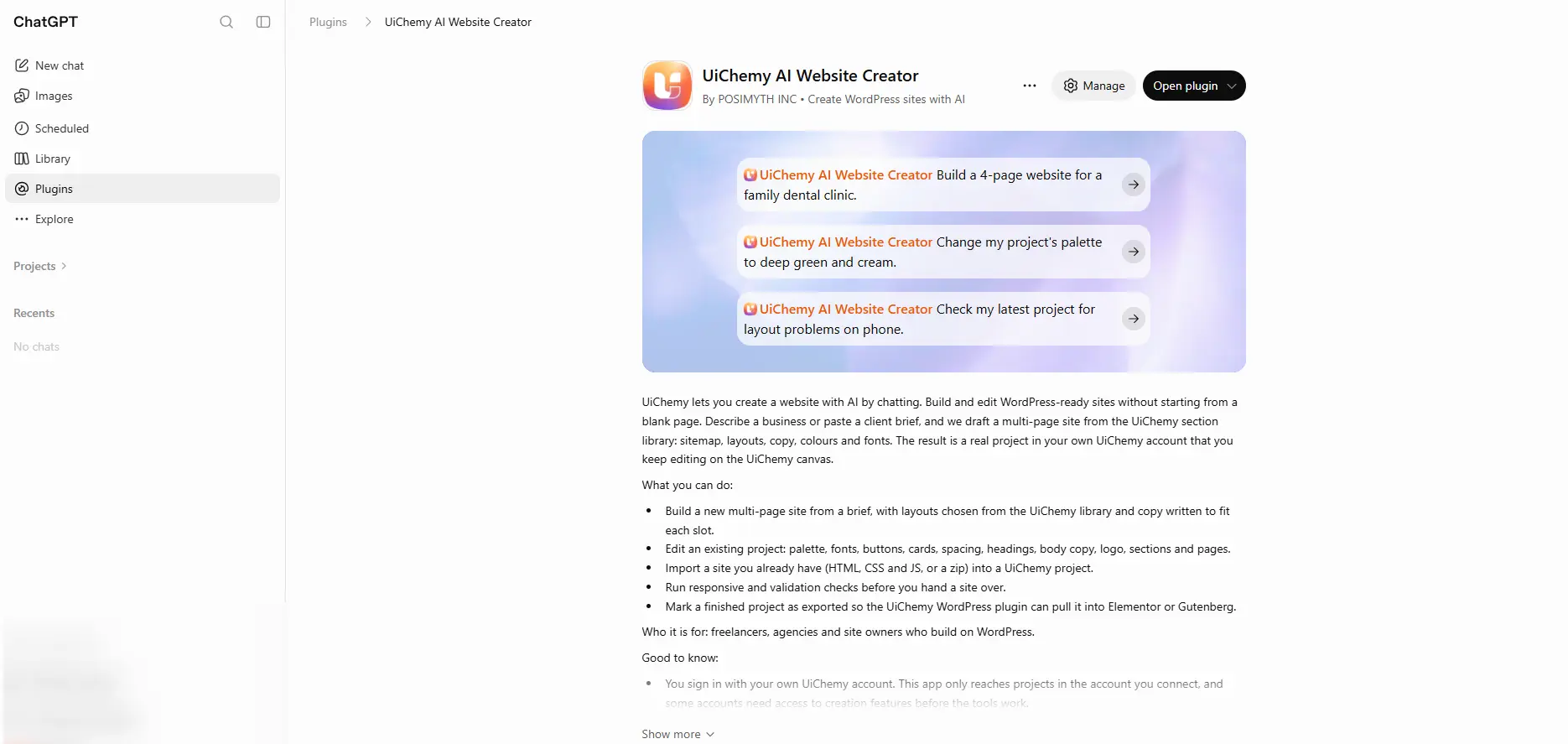
UiChemy AI Website Creator in ChatGPT's plugin directory
Built by POSIMYTH INC. It works with the same UiChemy account you use for AI Website Creator, and connects through the UiChemy MCP server at https://app.uichemy.com/api/mcp.
What You Can Do
- Build a new site from a brief, a multi-page site with layouts chosen from the UiChemy library and copy written to fit each section.
- Edit an existing project, palette, fonts, buttons, cards, spacing, headings, body copy, logo, sections, and pages.
- Import a site you already have, HTML, CSS and JS, or a zip, into a new UiChemy project.
- Run responsive and validation checks before you hand a site over.
- Get it ready for WordPress, mark a finished project as exported so the UiChemy WordPress plugin can pull it into Elementor or Gutenberg.
- Publish a live preview site on a UiChemy address, check its status, list your sites, and take one offline.
Who it's for: freelancers, agencies, and site owners who build on WordPress.
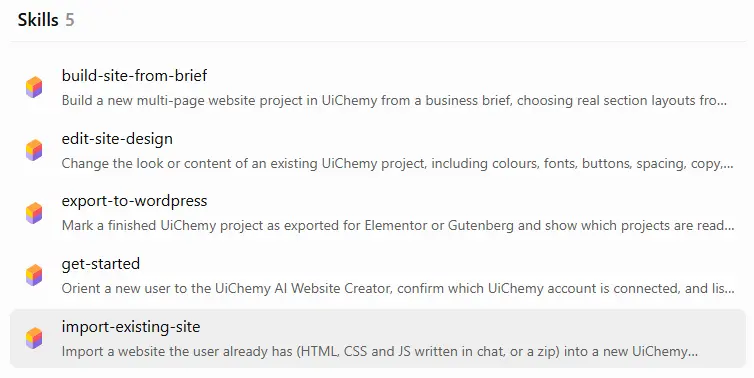
The 5 skills that come with the plugin in ChatGPT
| Skill | What it does |
|---|---|
| get-started | Introduces the plugin and confirms which UiChemy account is connected |
| build-site-from-brief | Builds a new multi-page project from a business brief, with real section layouts |
| edit-site-design | Changes the look or content of a project: colors, fonts, buttons, spacing, and copy |
| import-existing-site | Imports a site you already have (HTML, CSS and JS written in chat, or a zip) into a new project |
| export-to-wordpress | Marks a finished project as exported for Elementor or Gutenberg, and shows which projects are ready |
What You'll Need
- A ChatGPT account.
- A UiChemy account. Any signed-in account can connect, and your plan's limits on projects, pages and sections still apply. A guest session without an email can't connect, and some accounts need access to creation features before the tools work.
- A WordPress site with the UiChemy plugin, when you're ready to bring the site in. See Export to WordPress.
Set Up the Plugin in ChatGPT
Open the plugin
Open UiChemy AI Website Creator in ChatGPT's plugin directory.
Install it
Click Install plugin.
Sign in with UiChemy
Sign in with your own UiChemy account. The plugin only reaches projects in the account you connect.
Build a Site by Chatting
Tell ChatGPT what you want in plain language. Describe the business, the pages you need, and the look you're after, or paste a client brief. UiChemy drafts the sitemap, picks layouts from its section library, writes the copy, and sets the colors and fonts.
Example prompt: "Build a 4-page website for a family dental clinic."
The site is saved as a project in your UiChemy account, so you can open it on the UiChemy canvas and keep editing there too.
Edit and Check Your Site
Keep chatting to change the project. You can update the palette, fonts, buttons, cards, spacing, headings, body copy, logo, sections, and pages.
Example prompt: "Change my project's palette to deep green and cream."
Before you hand a site over, ask for a responsive or validation check.
Example prompt: "Check my latest project for layout problems on phone."
Import a Site You Already Have
Already have a site? Paste its HTML, CSS and JS into the chat, or share a zip, and UiChemy imports it into a new project in your account. From there you can edit it by chat or on the UiChemy canvas, like any other project.
Example prompt: "Import this landing page into a new UiChemy project," followed by your HTML, CSS and JS.
Bring It Into WordPress
When the site is ready, ask ChatGPT to mark the project as exported for Elementor or Gutenberg. You can also ask which of your projects are ready to import. Then pull it into WordPress with the UiChemy WordPress plugin, the same way as any AI Website Creator project. See Export to WordPress for the import steps.
Example prompt: "Mark my dental clinic project as exported for Elementor so I can import it into WordPress."
Publish a Live Site on a UiChemy Address
You can also publish a finished project as a live site on a UiChemy address, check its status, list your sites, and take one offline.
Publishing on a UiChemy address doesn't connect your own domain, change your hosting, or log in to your WordPress site. To put the site on your own WordPress, use Bring It Into WordPress above.
Good to Know
- You stay in control. The plugin asks for your confirmation before deleting a page, section, post, or project, and before publishing or unpublishing a site.
- Your account only. It only reaches projects in the UiChemy account you connect.
- Content rights. Use your own content and images, or content you have the right to use.
- Your data. When connected, ChatGPT may share relevant chats and memories with the plugin to help with your requests. You can manage your preferences or disconnect the plugin anytime in your ChatGPT settings.