How to Cancel Subscription of UiChemy Pro?
Cancel your UiChemy Pro subscription in a few simple steps from the Posimyth Store.
We understand that circumstances can change, if you need to cancel your UiChemy Pro subscription, we've made the process straightforward.
Steps to Cancel
- Visit the Posimyth Store and log in using the same details you used at checkout.
- Click Dashboard at the top of the page.
- Go to Manage Subscriptions, you'll see your current subscription plan here.
- Click Cancel next to your subscription plan, and confirm the cancellation request.
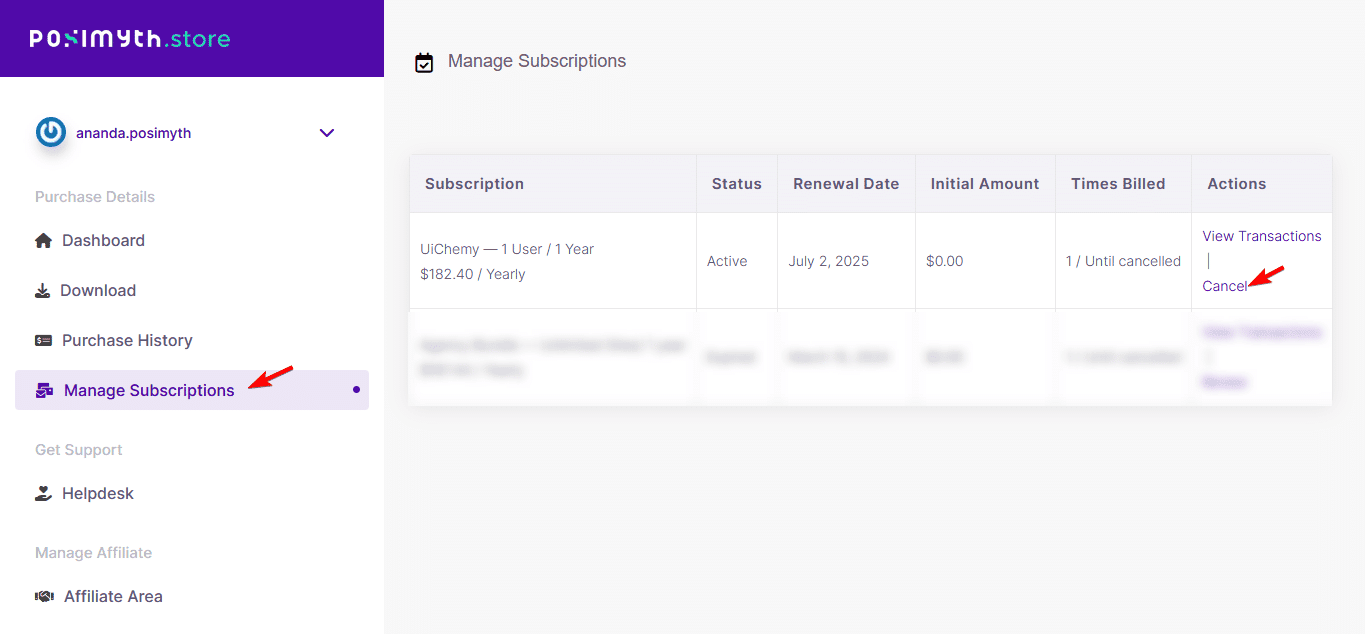
Once confirmed, your subscription is cancelled and you won't be billed for future payments.
If you have any questions about the cancellation process, reach out to our support team, we're happy to help.
Frequently Asked Questions
What should I do if I can't log in to my Posimyth account to cancel my subscription?
Make sure you're using the same login details from checkout. If you still can't access your account, reset your password or contact Posimyth support.
What happens to my access after I cancel my UiChemy Pro subscription?
You won't be billed again, but you keep access until the end of your current billing cycle.
Are there any limitations to canceling my UiChemy Pro subscription?
None specifically, you can cancel anytime, but you'll lose access to features and updates once your billing cycle ends.
What's the best practice for managing my UiChemy Pro subscription?
Regularly review your subscription status in Manage Subscriptions to stay ahead of upcoming charges, and cancel before the next billing cycle if you're not actively using it.
Can I reactivate my UiChemy Pro subscription after canceling?
Typically you'd log back into your Posimyth account and resubscribe, check with Posimyth support for specific reactivation policies.