

Conversion Settings
Control images, image format and compression, widths, text, RTL, and custom CSS in UiChemy's Conversion Settings before you export.
The Conversion Settings step is your last stop before converting. A few switches here decide how light, fast, and faithful your exported page is. Open it from either Step by Step Method or Quick Conversion, on the top-level page or frame of your layout.
Why Use These Settings
- Lighter, faster pages, export images in modern formats like WEBP or AVIF and compress them, so your site loads quicker.
- Faster, more reliable exports, exporting without images skips heavy asset processing, so large layouts import quicker and with fewer errors.
- Sensible defaults, every setting is optional. The defaults already give you a close visual match to your Figma design.
Settings in the Figma to Elementor Plugin
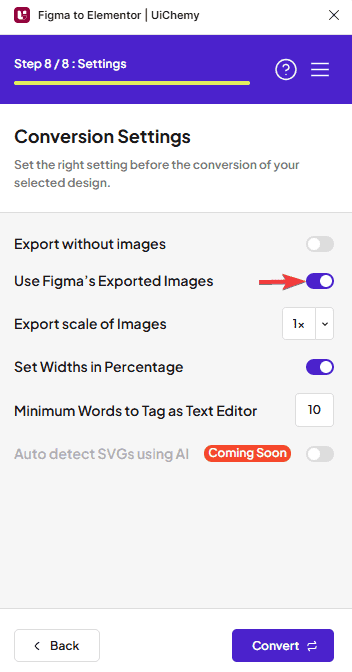
| Setting | What it does | Default |
|---|---|---|
| Export without images | Replaces your images with placeholder images, for a quick import. | Off |
| Use Figma's Exported Images | Uses Figma's own image export for your images. Hidden while Export without images is on. | On |
| Export Image Format | The file format for exported images: PNG, WEBP, AVIF, or JPEG. | WEBP |
| Image Compression Quality | How much images are compressed: Auto, 60%, 70%, 80%, 90%, a custom value from 1 to 100%, or Disable. | Auto |
| Export scale of Images | The pixel density images export at, for example 1x or 2x. | 1x |
| Set Widths in Percentage | Exports element widths as percentages instead of fixed pixels. | On |
| Minimum Words to Tag as Text Editor | Text with at least this many words becomes a Text Editor widget. | 10 |
| Export for RTL Languages (Beta) | Exports the layout for right-to-left languages. | Off |
Export Image Format, Image Compression Quality, and Export scale of Images only appear when Use Figma's Exported Images is on and Export without images is off.
Image Format and Compression
Smaller images mean faster pages. Pick a format in Export Image Format, then choose how hard to compress it in Image Compression Quality.
- Auto lets UiChemy pick a sensible compression level for you.
- A lower percentage gives a smaller file, a higher one keeps more detail. Type your own value (for example
85%) if the presets don't fit. - Disable turns compression off. WEBP and AVIF always use compression, so choosing Disable while one of them is selected switches the format to PNG. Switching back to WEBP or AVIF sets compression to Auto again.
Not sure what to pick? Keep the defaults, WEBP with Auto compression. It's a good balance of quality and file size for most sites.
Export Without Images
When you export a Figma layout with lots of images, or heavy images, it can take a long time or even show errors while importing into Elementor. Turn on the Export without images toggle to work around this.
Your images are replaced with Elementor placeholder images when you import the template, so the exported file imports quickly. This is also available for Gutenberg and Bricks Builder.
Disable Custom CSS (Gutenberg and Bricks)
By default, UiChemy may add a small amount of custom CSS during export to match your Figma design precisely. If you'd rather have fully clean, native page builder output with no additional CSS at all, turn on the Disable Custom CSS toggle in the Conversion Setting tab.
Turning this on may mean small visual details from your Figma design don't carry over exactly, since UiChemy relies only on your page builder's native styling options. The Figma to Elementor plugin doesn't have this toggle.
What You Get
With images exported in a modern format and compressed, you get a page that looks like your design and loads fast. With Export without images on, you get a template that imports faster, ready for you to add images later.