

How to Cancel Your Subscription
Cancel your UiChemy subscription from the Billing page, at the end of your billing cycle or right away with a refund request.
If you subscribed to a plan on the UiChemy Pricing page, you can cancel it anytime from your Billing page. You choose when the cancellation takes effect, and nothing changes until you confirm.
Open the Billing Page
Open the account menu
On your UiChemy dashboard, click your name and plan (for example, Studio plan) at the bottom-left of the sidebar.
Go to Billing
Click Billing in the menu that opens. You're taken to the Billing page.
What You See on the Billing Page
At the top, two cards show your plan details.
Current subscription shows your plan name, price, and renewal date.
Example: On the yearly Studio plan, the card shows Studio, $312.00 per year, renewing on September 30, 2027.
It has three buttons:
- Upgrade Plan: takes you to the Pricing page to move to a higher plan.
- Manage Subscription: opens the POSIMYTH INC billing portal with three tabs:
- Subscription: your subscription details. You can also cancel from here.
- Payments: your payment details.
- Account: your account details.
- Cancel: opens the Cancel Your Plan popup, covered below.
Billing address shows the email and address your invoices are billed to. It has two buttons:
- Update billing address: change the address on your invoices. Click it and follow the on-screen steps to save your new address.
- Update payment method: change the card or payment method used for your subscription. Click it and follow the on-screen steps to add your new payment details.
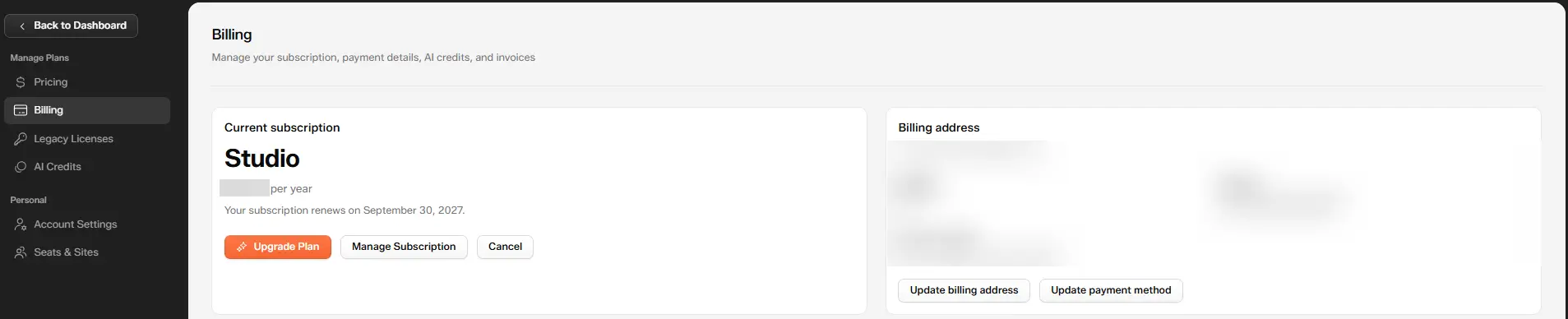
The Current subscription and Billing address cards on the Billing page
Cancel Your Plan
Click Cancel on the Current subscription card. The Cancel Your Plan popup opens with a summary of what you have today: your plan's Status, Billing cycle, Renews date, and Credits left this month.
Under When should your cancellation take effect?, pick one of two options:
| Option 1: End of Billing Cycle | Option 2: Immediately | |
|---|---|---|
| When it ends | On your renewal date | Right away, once support processes it |
| Your plan and Credits | Keep them until the renewal date | Stay active until support processes it |
| Refund | No, you use what you already paid for | Yes, if you're within your first 14 days |
| Button | Continue | Contact support |
Option 1: Cancel at the End of Your Billing Cycle
Select the first option, for example Next year, on September 30, 2027, then click Continue.
You keep your plan and your Credits until that date. There are no further payments, and you use everything you already paid for.
Example: You're on the yearly Studio plan, paid through September 30, 2027. If you choose this option today, you keep Studio and your remaining Credits until September 30, 2027, and you aren't charged again after that.
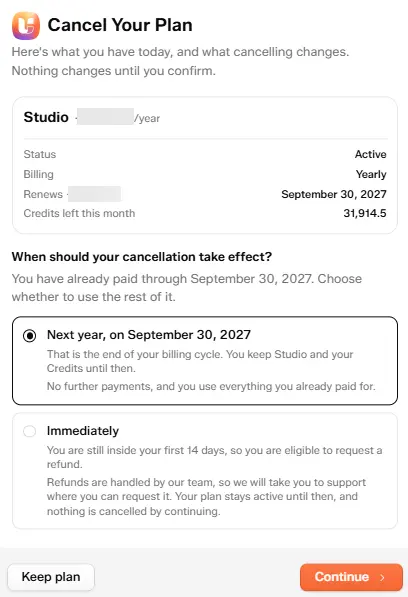
Next year selected, then click Continue
Tell us why you're cancelling. After you click Continue, the popup asks "Why are you cancelling your UiChemy subscription?" Your feedback helps improve UiChemy and only takes a few seconds. Choose the reason that fits best:
- I was just trying UiChemy to see how it works
- I finished building the website I needed
- The price is too high for me right now
- I don't use UiChemy often enough
- The AI website builder didn't give the results I expected
- It was difficult to use or confusing
- Some features I needed are missing
- I found another tool that works better for me
- Other
Then click Continue. Click Back to return to the previous step.
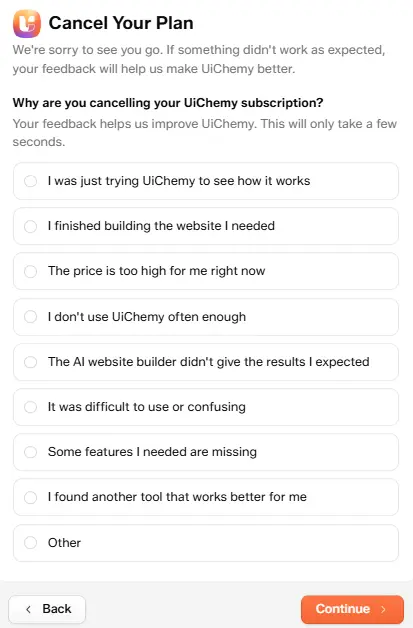
Choose why you are cancelling, then click Continue
Option 2: Cancel Immediately With a Refund Request
Select Immediately. This option is for cancelling right away and requesting a refund, which you're eligible for within your first 14 days.
Refunds are handled by the UiChemy support team, so the button changes to Contact support. Your plan stays active until then, and nothing is cancelled just by clicking the button.
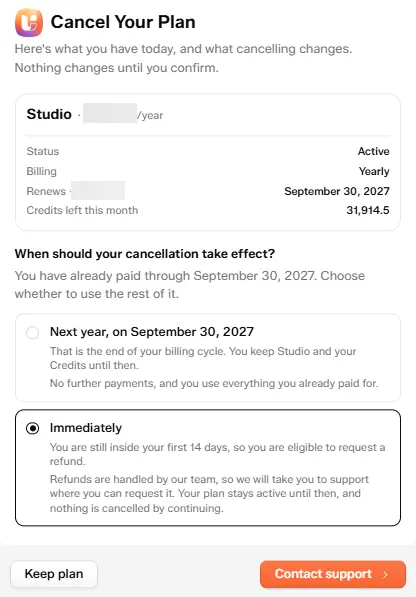
Immediately selected, with the Contact support button
Clicking Contact support takes you to the UiChemy Support page, which opens with "How can we help you today?" From there you can:
- Ask me anything: type your question in the message box, attach a file with the paperclip icon if needed, and send it with the arrow button.
- Get Support: raise a support request, for example to ask for a refund and cancellation.
- Request a feature: suggest something you'd like UiChemy to add.
- Doc Guides: browse the documentation.
The support team will help you with your refund and cancellation. Use the Messages tab at the bottom to follow your conversation, and News for product updates.
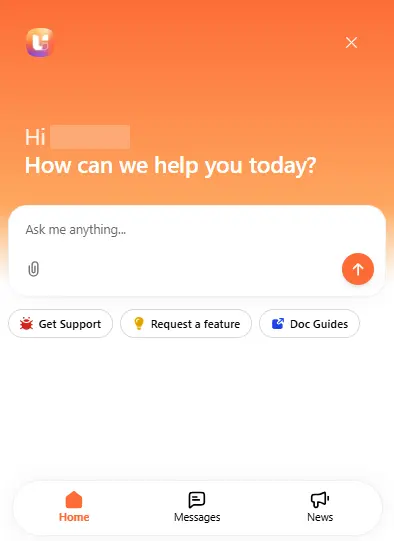
The UiChemy Support page after clicking Contact support
Example: You subscribed to the yearly Studio plan on September 30, 2026, so your refund window runs until October 14, 2026. On October 5, 2026, you decide it isn't the right fit. You're still within your first 14 days, so select Immediately, click Contact support, and ask the team for a refund. Your plan keeps working while they process your request.
Changed Your Mind?
Click Keep plan at the bottom of the popup, or close it with the X in the top-right corner. Nothing changes, and your subscription continues as before.